Tuesday, September 2, 2014

Ridiculous, desperate gadgets students use to cheat

No matter the consequences, students continue to find new ways of cheating on exams. Below are some of the gadgets used to cheat—methods we don't condone. Teachers, take note.


China's insanely stressful college entrance exam process

A camera penThis hidden camera inside a pen (second from the left) and a receiver disguised as an eraser were confiscated by police during the two-day National College Entrance Exam in China.

China's insanely stressful college entrance exam process

A high-tech shirt
This more complex cheating contraption was also confiscated by police during the two-day National College Entrance Exam in China.

Scanner
Manipulating a product label

It's not overly difficult to edit the label of a water or soda bottle. First you remove the label and scan it. In Photoshop, you can add answers, formulas, or whatever you need for the exam. Then you re-print the label using glossy paper, then re-apply to the bottle. This YouTube video explains all the steps.

China's insanely stressful college entrance exam process

Glasses with a camera
These glasses contain a hidden camera while a coin has a tiny receiver.

 Graphing calculator

Graphing calculator
Graphing calculators allow you to program formulas — a handy way to cheat during a tough algebra exam.

 Watch calculator

Watch calculator
A watch calculator can also programs formulas, with the added bonus that most teachers are fine with students bringing watches into an exam.

 Earpiece

Earpiece
This is admittedly an extreme form of cheating, but many students have had answers relayed to them via small earpieces.


China's insanely stressful college entrance exam process

This is admittedly an extreme form of cheating, but many students have had answers relayed to them via small earpieces.

These cell phones and receivers are just some of the devices confiscated from students trying to cheat during the two-day National College Entrance Exam in China.

MP3 pen

MP3 pen
An MP3 pen allows you to load audio clues ahead of time. Of course, cheaters can't disrupt an exam with loud audio, which is why they have discrete ear buds or spy-like earpieces.

Google Glass

Google Glass
Once Google Glass becomes a mainstream consumer product, teachers might be forced to ban them from examination rooms.

 iPhone

 iPhone

The iPhone has no shortage of cheat tools. If you go to the washroom, or catch your teacher snoozing, you can always look up some notes you've pre-written. Or you could always Google the answer.


8 research sources for students that aren't Wikipedia

When students are instructed to write their research paper, they often get the same instruction for sources: Don't use Wikipedia as a source. After all, the online encyclopedia can be changed by anyone. While that can be a good thing sometimes, it can also lead to unverified information getting passed off as fact. Get off on the right foot by looking to these sources of research instead of Wikipedia. 


Research sources for students that aren't Wikipedia

Mathway
For those of us who were not born with natural mathematical talent, Mathway can be a lifesaver. Take your math homework to the site, and it will show you step by step how to solve it. Sign up for a free account, and you're good to go.

Research sources for students that aren't Wikipedia

Scared of Shakespeare? Frightened of Lord of the Flies? If you've been assigned a novel to read and feel in over your head, Spark Notes is a great resource for chapter-by-chapter book guides and even has some "no fear" versions of books, designed to help you make sense of writing from another time.

 Research sources for students that aren't Wikipedia

Google Scholar
When you need to go beyond books and seek out scholarly, peer-reviewed material, Google Scholar can help you out. It's an index of all the scholarly articles available online, although you'll occasionally be pointed to a site where you need paid access.

 Research sources for students that aren't Wikipedia

Encyclopedia Britannica
Once upon a time, encyclopedias were big books divided by letter that you had to scour to find the topic you wanted. Now, all that well-researched information is available online and isn't nearly as cumbersome to carry around. You get limited access for free, or you can pay an annual fee for more.

Research sources for students that aren't Wikipedia


Infoplease
Another great encyclopedia-style resource, Infoplease is created by Pearson, the world's largest education company and book publisher. In addition to the 57,000 articles in the Columbia Encyclopedia, you have access to a dictionary, periodic table, conversion tool, and "this day in history" fact sheet, as well as lots more for free.

Research sources for students that aren't Wikipedia

The Internet Public Library
Just like at a physical library, you can browse different sections by subject or search for the topic you want, and you'll be directed to dozens of websites to help you do the research you need.

Research sources for students that aren't Wikipedia

Google Books
Google has a huge collection of books digitized and searchable online, many of which are available for free. It's like walking into a library, yelling out your search term, and having the books you're looking for open up right in front of you.

Research sources for students that aren't Wikipedia

OWL @ Purdue Online Writing Lab
If you have a high school student at home learning to cite sources for the first time, this site may be your new best friend. There is detailed information on the two most popular citation styles, MLA and APA, as well as general guidelines for writing essays.


Monday, September 1, 2014

Deadliest places to dive

Are these the top 10 most dangerous (but awesome) diving spots in the world? Venture into the watery depths to find out.


Deadliest places to dive

Deadliest places to dive Are these the top 10 most dangerous (but awesome) diving spots in the world? Venture into the watery depths to find out.


Deadliest places to diveGerman U Boat Located off the coast of New Jersey in the US, the dangerous part of this dive is the depth. Heading down to over 65 metres, you will get to see a slice of history exploring the remains of a U Boat from World War II.
Deadliest places to dive

Blue Hole, Belize This beautiful natural phenomenon can easily distract even an experienced diver into going beyond acceptable depths following the sheer drop offs in crystal clear water.

 Deadliest places to dive

Coco’s Island You travel 35 hours in a boat to get to this remote dive spot, making the isolation pretty dangerous. Once there though, you will be amazed at the incredible underwater wildlife.

Deadliest places to dive

Blue Hole, Egypt Nicknamed by some as the “Diver’s Cemetery,” due to the desire of divers to reach the underwater “Arch” where the Blue Hole meets the Red Sea.

Deadliest places to dive

 Black Hole, Bahamas After you helicopter in, you then battle the high sulfur levels and bacteria that is usually reserved for scientific research.

 Deadliest places to dive

Devil’s Cave System, Florida the danger here is losing yourself in the cave system. If you can sort that, you can enjoy the warm, clear waters and go exploring.

Deadliest places to dive

The Shaft Sinkhole, Australia Located in Mount Gambier, this water in this sinkhole is actually another 10 meters after you squeeze through the manhole on the surface, all tanked up and ready to go of course.

 Deadliest places to dive

Jacob’s Well, Texas some of the chambers here have a fine layer of silt. This is where people can get in trouble. If you can’t maintain neutral buoyancy, or control your kicking, you can knock up silt. This can completely disorient some divers, taking away all visibility.

Deadliest places to dive

Temple of Doom, Mexico The danger of this dive site in Tulum comes from the labyrinth of passages that are easy to get lost in. In those passages though they’ve found a lot of fossils, plus there are the really cool limestone formations.

 Deadliest places to dive

Samaesan Hole, Thailand Aside from the fact that this dive site is located in an active shipping lane, the deep depths make this only available for Trimix technical diving for which you will need a whole host of different gear.


The top 12 most extreme human dolls

These people give a whole new meaning to the phrase "all dolled up" - check out the most extreme cases of real-life human dolls!

The top twelve most extreme human dolls

These guys give a whole new meaning to the phrase "all dolled up" - check out the most extreme cases of real-life human dolls! Kicking off is Valeria Lukyanova, a 29-year-old Moldavian-Ukrainian model who is perhaps one of the most famous "human Barbie-dolls" in the world. Valeria's long legs, tiny waist and long blonde hair, coupled with her blue eye contacts and clever makeup, have gained her international media attention. In February 2014, she made headlines when she announced she would not consume any food or water for an unspecified time, and instead live exclusively on light and air. As you do.

Celso Santebanes
Brazilian model Celso Santebanes has spent over $53,000 on surgery to look like a Ken doll. Santebanes has said he is obsessed with looking in the mirror and has launched his own line of 'Celso Dolls'.
 Anastasiya Shpagina

19-year-old Ukrainian woman Anastasiya Shpagina is becoming well known for being a real-life 'anime' girl. Part of the growing cosplay subculture, Shpagina uses eye contacts and makeup to transform herself into characters from Japanese cartoons and computer animations.

 Wang Jiayun

In China, Jiayun was quickly given a nickname: "chong qi wa wa" (充气娃娃 ) or "inflatable doll". She has used clever makeup and camera tricks to make herself resemble something out of a cartoon, but many internet users have declared her a fake who uses too much photoshop.

 Anzhelika Kenova

Anzhelika Kenova is a Russian woman who looks uncannily like Barbie, and certainly plays up her looks to emphasize her doll-like features.

Dakota Ostrenga

Also known as Dakota Rose and KotaKoti, this doll-like woman spends her time taking thousands of pictures of herself and uploading them to multiple social networking sites, as well as making make-up tutorial videos.

 Justin Jedlica

29-year-old Slovak American Justin Jedlica gained international attention for undergoing over 100 plastic surgeries to make himself look like a human Ken doll, Barbie's boyfriend.

 Lhouraii Li

Lhouraii Li, a 21-year-old from Bradford, England, wears special iris-enlarging contact lenses, 14 pairs of fake eyelashes and thick makeup in order to look like a Tree of Life Barbie doll.

 The 'Living Dolls'

This year Britain's Channel 4 released a documentary exploring the little-known practice of ‘female masking’ – in which men don masks and rubber bodysuits in order to live an alternative life as a human ‘doll’.

 Lolita RichiLolita Richi made news recently for being possibly the youngest human Barbie doll, at just 16 years old. Although Lolita's face and long-legged, curvy figure seem unreal, the teenager insists she has not had any plastic surgery.

 Venus Angelic

Venus Angelic certainly has an angelic face, and enjoys dressing up like a human doll and uploading photos to social media.

 Herbert Chavez


 Chavez, the 'Philippine Superman', underwent 19 surgeries over 16 years to look like his favorites action figure. The 35-year-old has had nose jobs, skin whitening, lip liposuction, jaw realignment, pec implants and even abdominal implants to become a real-life superhero.

Sunday, August 31, 2014

8 of the most ridiculously expensive gadgets money can buy

You need piles of money to afford these gadgets. Computers, smartphones, and tablets are expensive enough as it is. But when you outfit them with custom designer fabrics and jewels, they can cost you a mind-blowing sum of money. While some gadgets can run you thousands of dollars because of their luxurious build materials, others are extremely expensive because of the technology that’s inside them and what they can do. From gold-crafted iPhones to giant tablets with stunning displays, here are some of the most ridiculously expensive gadgets. 

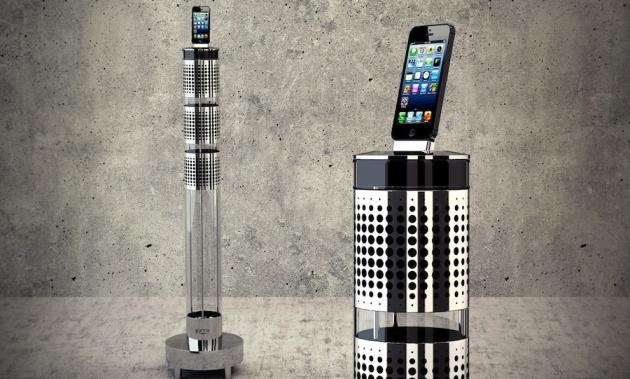
8 Of The Most Ridiculously Expensive Gadgets Money Can BuyAeroSystem One iPhone Dock/Speaker (about $1,115). Most people probably wouldn’t pay more than a few hundred dollars for a smartphone, let alone an accessory for your smartphone. But Jarre claims its sleek and tall iPhone companion is worth it. The sound system is said to be the result of years of research by French composer Jean Michael Jarre and his team.
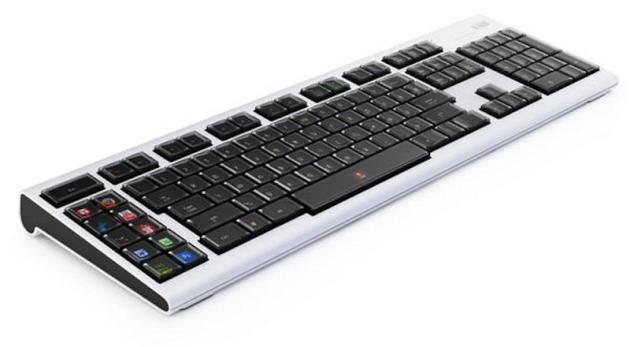
8 Of The Most Ridiculously Expensive Gadgets Money Can BuyOptimus Maxiumus Keyboard ($1,500). The Optimus Maximus keyboard sold for $1,500 when it launched six years ago. That’s because the device’s keys are fully programmable — meaning you can assign a different function to each key. Each button on the keyboard is a miniature display that tells you what its function is at a given time. Engadget has a brief review that explains how it works.
 8 Of The Most Ridiculously Expensive Gadgets Money Can Buy 

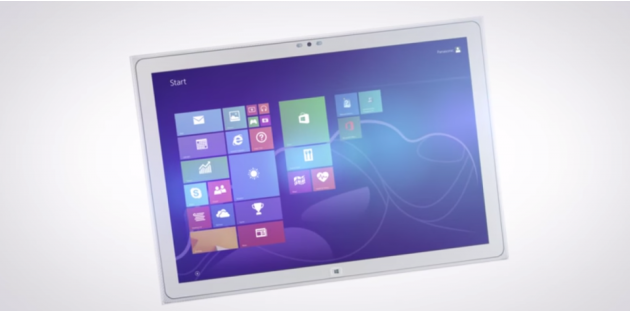
Panasonic 4K Toughpad Tablet ($6,000).Panasonic’s 4K Windows 8 tablet sells for $6,000, but you don’t have to worry about it breaking under stress. Since it’s a Toughpad, Panasonic’s rugged line of laptops and tablets, it can withstand being dropped from 2.5 feet. Rugged devices are usually much more expensive than regular computers since they’re equipped to meet certain standards. But the 4k Toughpad’s super-sharp 3,840×2,560-pixel-resolution display also accounts for its high price tag.


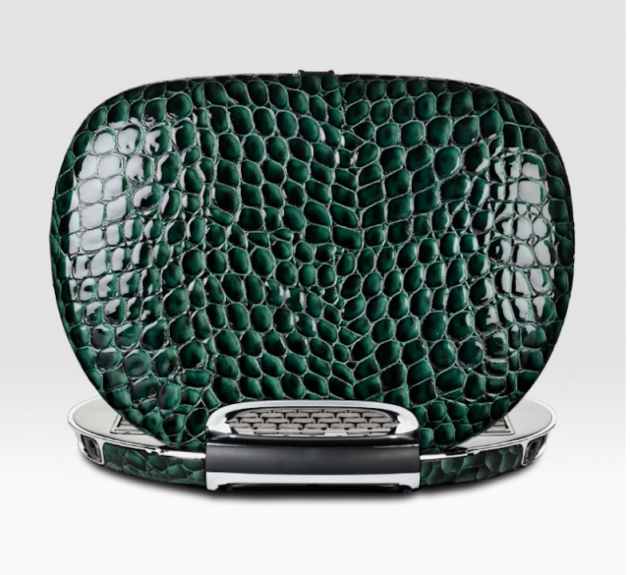
8 Of The Most Ridiculously Expensive Gadgets Money Can BuyEgo Lifestyle Emerald PC Notebook Computer ($10,900). If you’re willing to shell out nearly $11K on a laptop, Ego Lifestyle’s emerald PC is available via Saks Fifth Avenue’s website. The PC claims to combine “high tech and fashion,” and features a handcrafted, interchangeable exterior made of crocodile Italian leather. The downside: It runs Windows Vista.

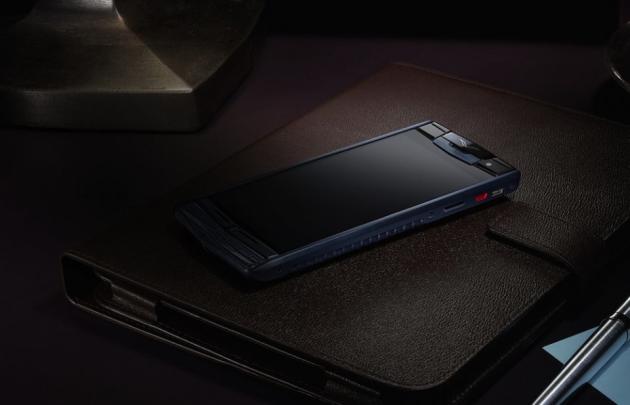
 8 Of The Most Ridiculously Expensive Gadgets Money Can Buy Vertu Signature Touch ($18,000-$20,000). The Vertu Signature Touch’s high-end price is all about its design. All of Vertu’s smartphones are handmade in England, the company says. The phone’s casing is made of natural-grain alligator leather and grade five titanium alloy, which Vertu claims is 2.5 times stronger than stainless steel but is still light. The display is also made of scratch-resistant sapphire crystal.
8 Of The Most Ridiculously Expensive Gadgets Money Can BuyLuvalgio Laptop ($1 million). Luxury manufacturer Luvalgio grabbed headlines a few years ago when it claimed to be making a high-end laptop falling into the $1 million price range. The company showcases its premium laptop, which appears to be encased in some sort of designer fabric, on its website. You need a password, however, to view the details. CNET previously reported in 2007 that it comes with an integrated screen cleaner, solid-state storage, and a Blu-ray player, among other features. Details about Luvalgio’s $1 million laptop remained scarce over the past few years, but it’s still interesting to contemplate what a $1 million laptop would be like.

    8 Of The Most Ridiculously Expensive Gadgets Money Can BuyStuart Hughes iPad 2 Gold History Edition ($5 million). Designer Stuart Hughes has re-created Apple’s iPad 2 and encrusted it with 12.5 carats of flawless diamonds. But that’s not what makes it so expensive. According to Hughes’ website, its the main front frame that’s crafted from one of the oldest rock in the world, the more than 75-million-year-old ammolite, that makes it worth a whopping $5 million. Not to mention the 65-million-year-old T-Rex bones that are embedded within the rock.
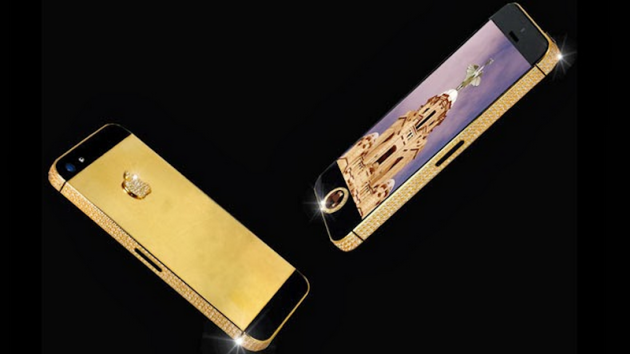
8 Of The Most Ridiculously Expensive Gadgets Money Can BuyStuart Hughes Black Diamond iPhone 5 ($10 million). If you thought $5 million was expensive for an iPad, how about paying $10 million for a smartphone? That’s how much designer Stuart Hughes charges for his diamond-encrusted iPhone 5, which took nearly nine weeks to create by hand. Hughes re-created the iPhone 5′s chassis with solid gold and embedded a single deep-cut black diamond.

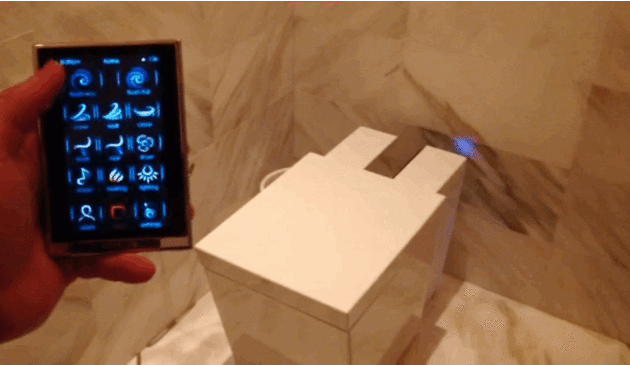
 8 Of The Most Ridiculously Expensive Gadgets Money Can BuyBONUS: Here’s a $6,7000 Toilet Kohler Numi’s $6,700 toilet is fully automated, which means you never actually have to touch the toilet with your hands. Instead you control the toilet using its touchscreen remote control. Other features include a heated seat, integrated bidet, color-changing lights, controls for music, and even a heater for your feet.
 What would you choose to buy?


Wednesday, August 27, 2014

To Install a Printer


Install a printer


When you connect a printer to your PC or add a new printer to your home network, you can usually start printing right away. Windows supports most printers, and you probably won't have to go out of your way to install special printer software. If you're using Windows 8.1 or Windows RT 8.1, additional printer support and drivers are available through Windows Update.

To install a printer

In most cases, all you have to do to set up a printer is to connect it to your PC. Simply plug the USB cable from your printer into an available USB port on your PC, and turn the printer on.

Notes

  • If you have a new wireless printer that hasn’t been added to your home network, read the instructions that came with the printer to learn how to add it.
  • If someone else in your home already has a printer installed and has shared it, you can join a HomeGroup and use that printer. To learn more, see HomeGroup from start to finish.
  • Check the printer manufacturer’s website to learn more and to get up-to-date software for your printer.

To see if a printer is installed

  1. Swipe in from the right edge of the screen, tap Settings, and then tap Change PC settings.
    (If you're using a mouse, point to the lower-right corner of the screen, move the mouse pointer up, click Settings, and then click Change PC settings.)
  2. Tap or click PC and devices, and then tap or click Devices.
    If your printer is installed, it should appear under Printers.
  3. If your printer isn’t listed, tap or click Add a device, and then select your printer to install it.
If your printer isn't showing up, make sure that the printer is turned on and double-check that all of the cables are plugged in firmly. For more info about solving printer problems.
OR IN OTHER WAY
The set up process is usually the same for most printers:
  1. Install the cartridges in the printer and add paper to the tray.
  2. Insert installation CD and run the printer set up application (usually "setup.exe"), which will install the printer drivers.
  3. Connect your printer to the PC using the USB cable and turn it on.
  4. Look in your printers folder on your computer (on Windows XP, go to "Start" then "Printers and Faxes". On Vista and Windows 7, hit the Windows key and type "printers" into the search box to quickly get to the Printers section. For Mac, go to System Preferences and select "Print & Fax".)
  5. Print a test page. In Windows, right-click on the printer and go to "Properties" then click the "Print Test Page" button. On Mac, click on the "Options & Supplies" button, then the "Utility" tab and click "Print Test Page"
EXPAND
EXPAND
If all goes well, your test page will print and your printer will now be set up.


Download Printer Drivers from the Manufacturer
If you don't have the CD or DVD from the manufacturer any more, you'll need to download it from the manufacturer's website. As with finding the printer manual, you can do a Google search for the name and model of your printer plus the word "driver" (e.g., "HP Desk Jet 3050 driver").
Here are some links to the driver downloads sections of major printer manufacturers.
  • HP: Select your printer category or type in the name and model in HP's search box.
  • Canon: Click on "Consumer & Home Office" then "Printers & Multifunction" then your printer series and finally "Drivers & Software" beside your printer model.
  • Epson: Choose your printer category then select the model, or type in the product name in Epson's search box.
Make sure you download the driver specifically for your operating system (e.g., Windows XP or Windows 7).


Thursday, August 21, 2014

Tools Use For PC Aseembly


Screw


Image result for screw

A short, slender, sharp-pointed metal pin with a raised helical thread running around it and a slotted head, used to join things together by being rotated so that it pierces wood or other material and is held tightly in place.

Screwdrivers and nut drivers


pc building repair upgrade tools screwdrivers
For the vast majority of PC builds and upgrades, a basic No. 2 Phillips screwdriver will be the only tool you’ll need. As you start working with more diverse hardware and accessories, or if you delve into the warranty-voiding world of PC modifications, you'll need different-size screwdrivers and nut drivers.
I keep an array of screwdrivers on hand, as well as a bit-driver and an assortment of magnetic bits. I also like to have a small electronics toolkit handy, on the off chance that I’ll need to disassemble a drive or other accessory that’s held together with a less-common type of screw. Most small electronics tool kits will feature Allen (hex), Torx, Phillips, and flat-head bits. Another screw type that’s becoming more common is the five-pointed Pentalobe, which is used on some Samsung SSDs and mobile devices.
If you’re constantly building and upgrading systems, it may be worth investing in a power screwdriver. I use one when working with larger screws that are less likely to strip, like the ones used to secure a case’s side panel or when mounting drives.
Low-cost power screwdrivers are available, but it’s typically the more expensive offerings that are best suited to PC-building. Look for a model that has an adjustable clutch and a handle that can flip to different positions. The adjustable handle will make it easier to squeeze into tight spaces, and the adjustable clutch will reduce the likelihood of stripping screws or mounts.

Pliers, cutters, and strippers 

pc building repair upgrade tools power driver
’m finicky when assembling systems. I hate to leave anything inside a rig when I know it won’t be used. Unfortunately, it’s becoming increasingly common to find extra connectors dangling inside some cases (when was the last time you used an AC’97 digital-audio connector?), and many cooling fans have both 3- and 4-pin power connectors attached (you’ll need one or the other, not both). Removing unused connectors not only cleans things up, it also minimizes confusion for less-savvy upgraders. To remove those connectors, I like to use a small wire cutter to snip any wires attached to the connector. Wire cutters are also handy for snipping excess nylon from zip ties and other types of tie-downs.
A good wire stripper is immensely useful any time you want to do more advanced electrical or wiring modifications. I can’t count the times I’ve swapped out a floppy-drive power connector on a cheap power-supply unit (PSU) when I’ve needed an additional SATA power connector. A pair of needle-nose pliers or long tweezers is ideal for picking up dropped screws and grabbing small connectors or wires to manipulate them in tight spaces.
pc building repair upgrade tools flashlight
A good head-mounted lamp or adjustable clip-on light is incredibly useful when building or upgrading a system. I know this seems obvious, but it’s often overlooked.
Many of today’s more popular cases have black or dark-colored interiors, which can make it difficult to spot small screws and other components unless you’re working in a perfectly lit room (and we both know those don’t exist). Do yourself—and your eyes—a favor and spring for a head-mounted lamp or other small, adjustable light.

Straps, zip ties, and tie-downs

pc building repair upgrade tools tie-downs
Effective cable management is paramount to a clean and cool-running system. But you can’t simply will the rat’s nest of wires and cables inside a typical system into place. You’ll need a variety of straps, adhesive tie-downs, and zip ties, along with a dollop of creativity and patience.
I always keep a tub of nylon zip ties of various sizes and colors on hand, in addition to a roll of thin Velcro straps. Most cases will have locations to tie everything down; adhesive tie-downs come in handy for those that don’t.


If you would ask me, if I would be a tool, what would it be? Why?
If I were a tool, I wanted to be a screw.
Why? I wanted to be a screw because I can put 2 materials together without being loose.
While in life, I can be a reason to put each other as friends,
I can be a peace-maker.
Like if you need help in whatever like you kinda lose your friend, you can ask help from me to put you two together in peace. J